
Docs / Claude guides

How to Delete a Claude API Key

Claude API keys stay active until you delete them. A leaked credential, a key tied to a completed project, or any token overdue for rotation all carry ongoing risk. Deletion is permanent and instant. Make sure no active service still depends on the key before you proceed.

In this guide, we'll walk through two methods to delete a Claude API key:

  • Delete a Claude API key in the Claude Console
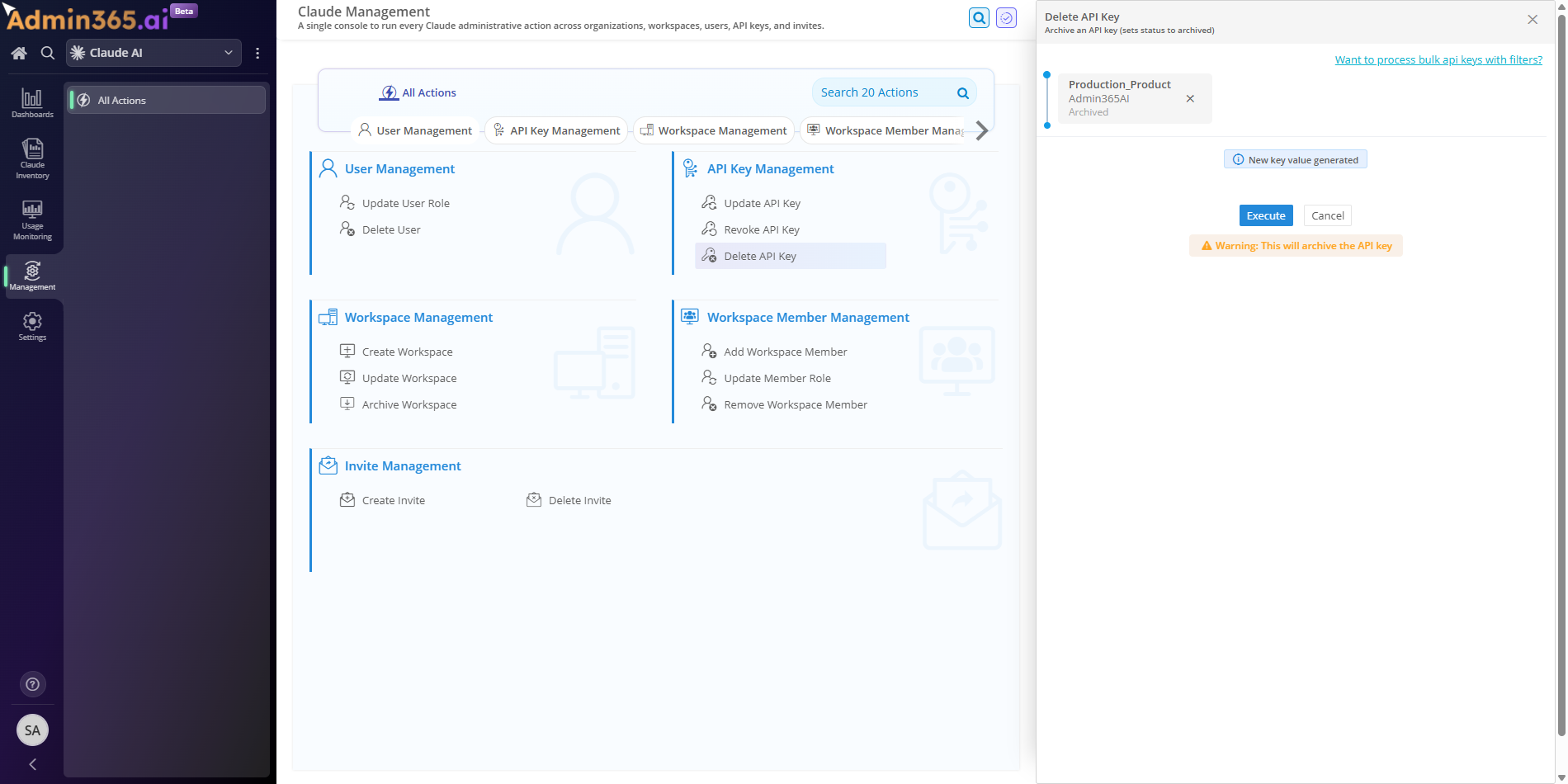
  • Delete a Claude API key in Admin365

Choose a method

How to Delete an API Key in the Anthropic Console

You can delete a Claude API key in the Anthropic Console. Use the Console when a key is no longer in use, has been exposed, or needs to be replaced.

Steps to Delete an API Key in the Claude Console

  1. Sign in to the Anthropic Console.

  2. In the left sidebar under Organization settings, click API keys.

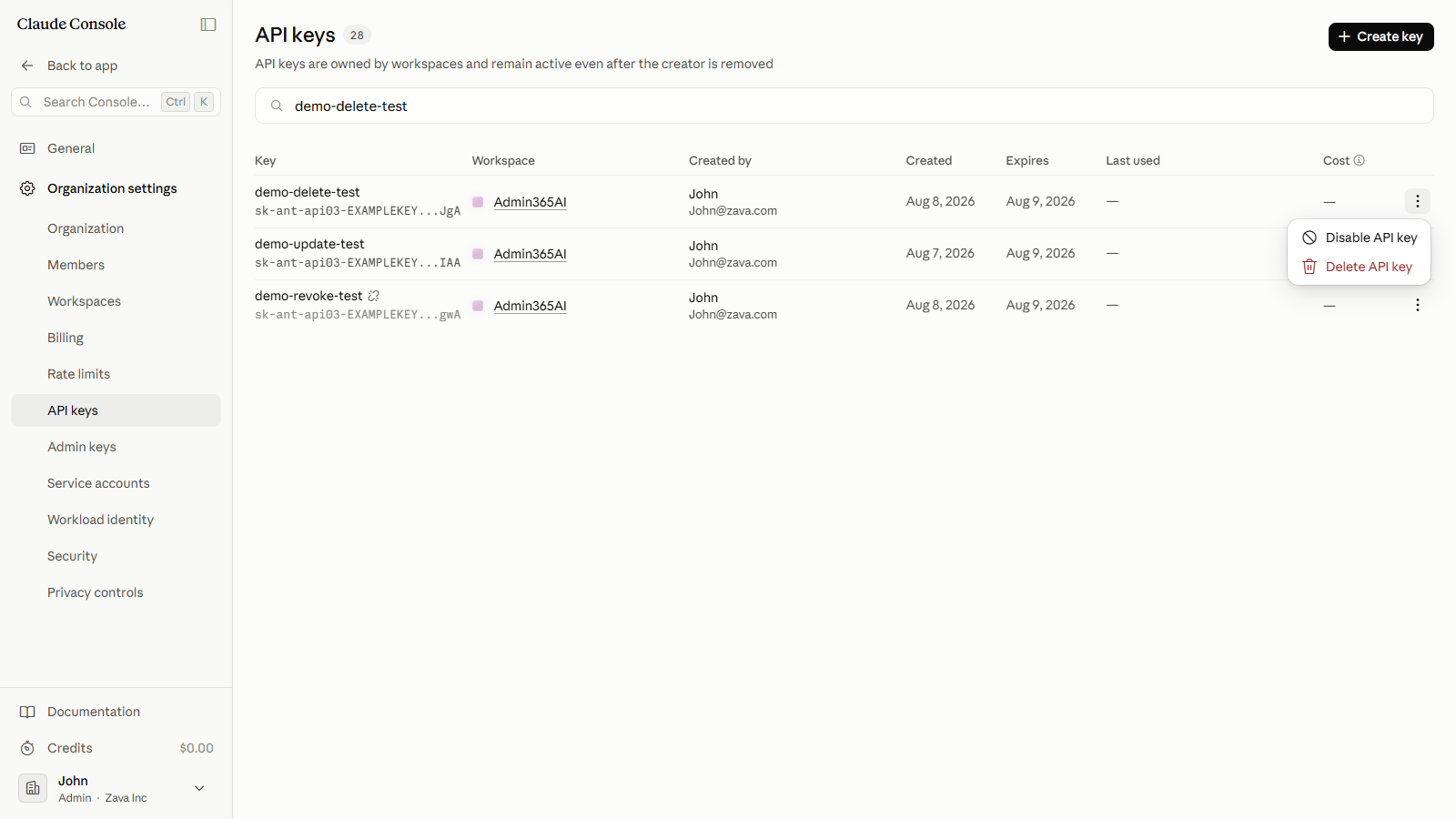
    The API keys page lists every key in your organization, with the name, workspace, creator, and creation date.

  3. In the Search keys box, type the key's name to filter the list. Check the name, workspace, and creation date to confirm you have the right key before continuing.

  4. At the end of the key's row, click the (More actions) button.

The More actions menu showing Disable API key and Delete API key options
  1. Click Delete API key. To pause access without permanently removing the key, click Disable API key instead. A disabled key can be re-enabled; a deleted key cannot be restored.

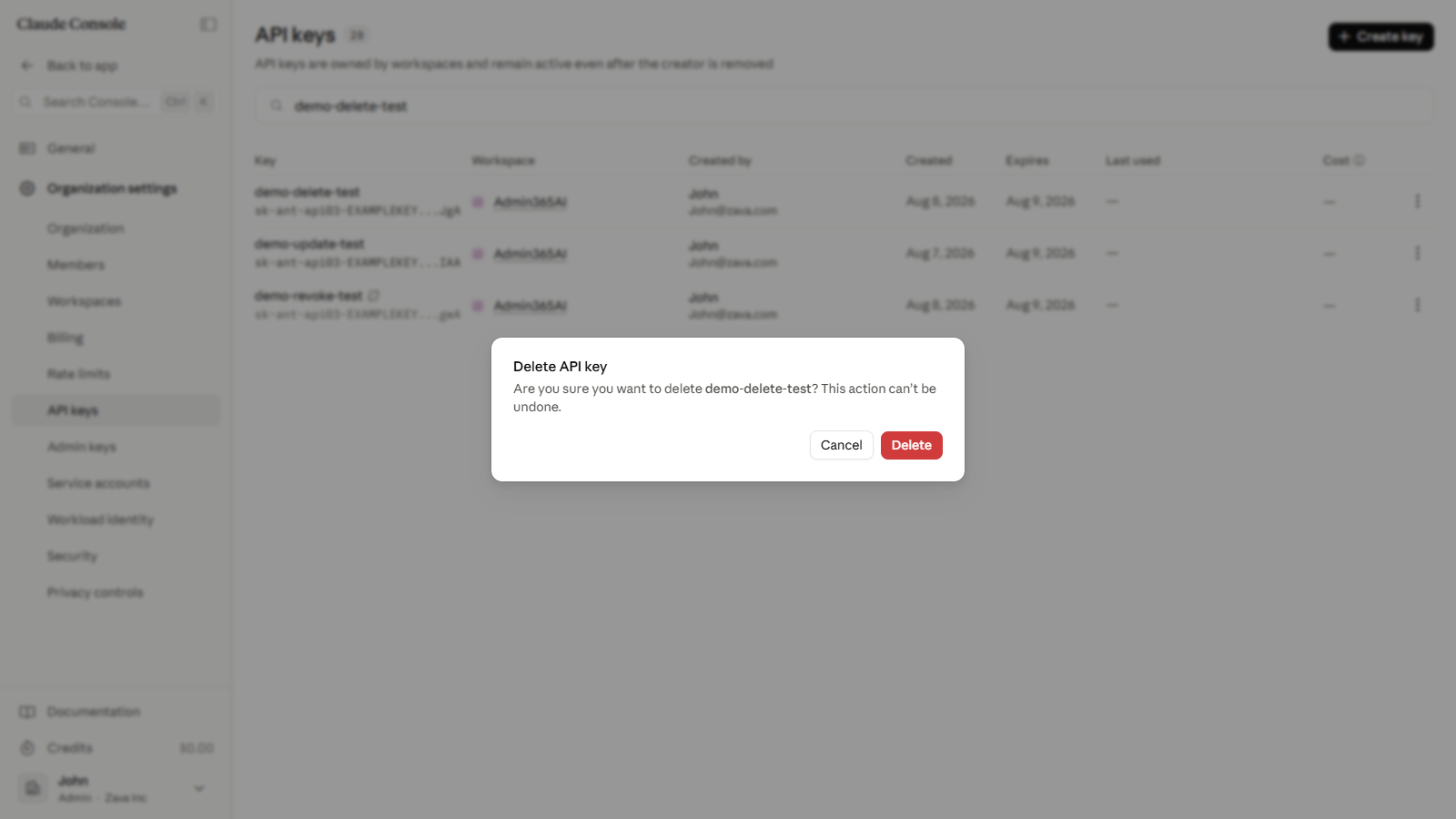
  2. In the confirmation dialog, click Delete. The dialog warns that the action cannot be undone.

The delete confirmation dialog with a warning that the action cannot be undone

API Key Security Best Practices: Keeping Your Keys Safe and Secure

  • Before deleting, confirm no active application or service still references the key. Any integration using a deleted key receives authentication errors immediately.
  • When a key is compromised, delete it right away. Create a replacement key and update your integrations to use it before services are disrupted.
  • Store API keys in a secrets manager or environment variable. Never commit keys to source code or share them in plaintext.
  • Review the API keys page periodically and delete keys that are no longer in use. Removing inactive keys reduces your attack surface.
  • Rotate keys on a schedule rather than waiting for a compromise. Short-lived keys limit exposure if one is leaked.

Claude API error 401 unauthorized after deleting the key

Errors when deleting a Claude API key fall into two categories. Some occur during the delete itself; others surface in apps after the key is gone. Match the error text you see to an entry below, then follow the resolution.

Deleting the Wrong Claude API Key Cannot Be Undone

Error:

This action can't be undone.

What it means: Delete permanently removes the key, unlike Disable which only deactivates it and can be re-enabled later.

Solution: If you only need to pause a key, click Disable API key instead; if a live workload still needs access, create a replacement key before deleting.

Fix 401 Invalid x-api-key After Deleting a Claude API Key

Error:

{"type":"error","error":{"type":"authentication_error","message":"invalid x-api-key"}}

What it means: A deleted key is revoked immediately, so any application still sending it is rejected with a 401.

Solution: Create a replacement key in the Claude Console, then update every app, secrets manager, and ANTHROPIC_API_KEY value to the new key.

Fix 401 Invalid Authentication Credentials in Claude Code

Reported error:

API Error: 401 {"type":"error","error":{"type":"authentication_error","message":"Invalid authentication credentials"}}

What it means: The deleted key is still exported as ANTHROPIC_API_KEY, and the SDKs read that variable automatically, so Claude Code keeps sending the dead credential.

Solution: Run unset ANTHROPIC_API_KEY (Remove-Item Env:ANTHROPIC_API_KEY on Windows) to clear the stale key, then run /login to re-authenticate.

403 Permission Error When Deleting a Claude API Key

Error:

{"type":"error","error":{"type":"permission_error","message":"Your API key does not have permission to use the specified resource."}}

What it means: Your Console role, or the credential behind Admin365, lacks the API-key management permission that deleting a key requires.

Solution: Ask an organization owner or admin for a role that can manage API keys, or have that person delete the key for you.

404 Not Found When the API Key Was Already Deleted

Error:

{"type":"error","error":{"type":"not_found_error","message":"The requested resource could not be found."}}

What it means: Delete is permanent, so a second delete or any later reference to that key ID targets a resource that no longer exists.

Solution: List your keys with GET /v1/organizations/api_keys to confirm the key is gone; a key that is already deleted needs no further action.


Govern Claude API Keys with Admin365

Delete stale Claude API keys across every workspace before they become a security liability.

Download Admin365